
We’ve all experienced it heading to work, excited to listen to your favorite playlist, but your data is lagging, or you’re constantly switching devices to get your music. It’s annoying, right? That’s where Apple Music comes in.
Designed to tackle these everyday frustrations, Apple Music offers a smooth, flexible experience that ensures your music is always ready, wherever you are and on any device you use. With Apple Music’s easy access to millions of songs, offline listening, and cross-device support, you can enjoy music without the hassle.
What Apple Music Offers Plans at a Glance
Apple Music offers several subscription plans to fit different needs. Here’s a breakdown of what each plan includes:
1. Individual Plan
This is the basic plan for solo listeners. With the Individual Plan, you get:
- Access to over 100 million songs
- Offline listening to download your favorite tracks or playlists
- High-quality audio (including lossless and Spatial Audio)
- Ad-free experience for uninterrupted music
- Works across all your devices seamlessly
It’s the go-to option for anyone who wants full access to Apple Music at a fair price.
2. Student Plan
If you’re a student, the Student Plan gets you the same great features as the Individual plan, but at a discounted price.
- Full access to 100M+ songs
- Offline downloads for music on the go
- Ad-free listening
- Discounted rate for eligible students
It’s a no-brainer if you’re a student on a budget, but still want all the benefits of Apple Music.
3. Family Plan
The Family Plan allows you to share a subscription with up to six people. Everyone gets their own:
- Personal libraries and playlists
- Custom recommendations
- Offline listening
- Ad-free experience
It’s perfect for households or groups of friends who want to share music without mixing up their accounts.
4. Apple One Bundle
If you’re already using Apple services, the Apple One bundle may be a great option. It combines Apple Music with other services like Apple TV+, iCloud storage, and Apple Arcade into one plan. This can be a cost-effective way to get everything Apple has to offer at once.
Key Features of Apple Music That Actually Move the Needle
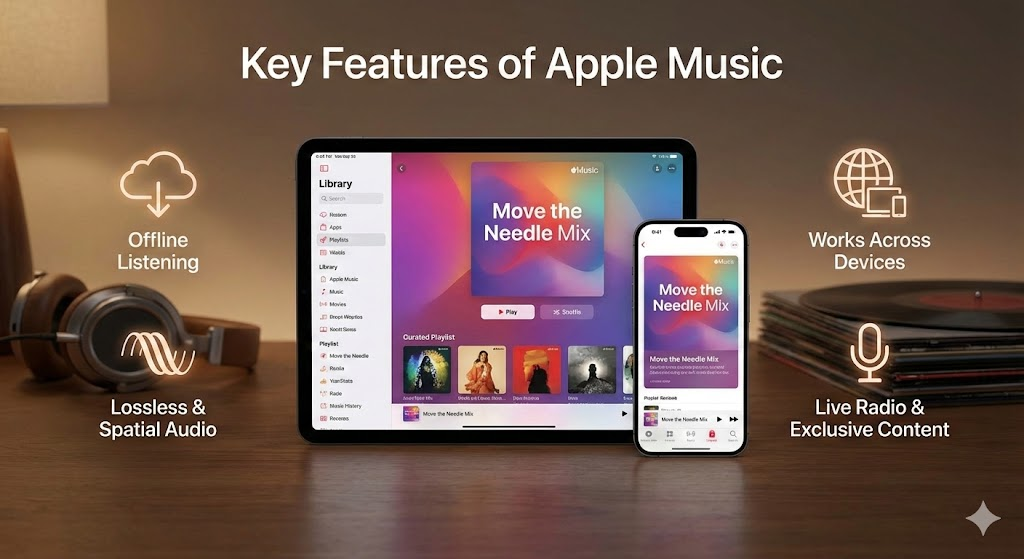
When you dig into Apple Music, you find more than just a big song list. It’s packed with features that make listening easier, richer, and more personal stuff that actually matters when you hit play.
Massive Library + Curated & Smart Playlists
- Access to 100 million+ songs, spanning every genre, era, and vibe you can think of
- Expert‑curated playlists and ready‑made mixes perfect when you don’t feel like picking songs yourself. Plus, personalized suggestions based on what you listen to: you discover new tracks without effort
Offline Listening Music That Follows You (Even Offline)
- Add songs, playlists, or albums to your library then download them for offline listening. Good news for commutes, travel, or low‑internet zones.
- Once downloaded, songs behave like local files. No buffering. No surprises. Just smooth playback.
Premium Audio Quality Feel the Music, Not the Compression
- Songs stream in Lossless Audio (ALAC 16‑bit/44.1kHz up to 24‑bit/48kHz) meaning you hear every detail, just like the artist intended.
- For an even richer experience, many tracks support Spatial Audio with Dolby Atmos, delivering a surround‑sound–like feel that makes music immersive, especially on compatible headphones or speakers.
Works Across Devices No Limits on Where You Listen
- Apple Music is built to run on phones, tablets, computers, smart‑TVs, speakers, and more whether you’re in Apple ecosystem or not.
- That means you can start listening on your phone and seamlessly switch to your laptop or TV without interrupting the vibe.
Live Radio, Original Shows & Exclusive Content Always Something New
- Beyond on‑demand tracks, Apple Music offers live radio stations and broadcast shows think curated radio with DJs, genre‑based shows, or artist‑hosted specials.
- Subscribers also get access to exclusive content: live concerts, artist interviews, and video/music‑video content not easily available elsewhere.
Extras That Make Listening More Fun & Social
- Live lyrics see synced lyrics while the song plays; great for singing along or really feeling the words.
- Personal libraries + sharing & social features build your own playlists, follow friends or artists, see what they listen to, discover new tracks via their picks.
- Specialised apps for niche tastes e.g. a dedicated classical‑music app for people who prefer orchestral or instrumental tracks.
How to Get Started with Apple Music: Step-by-Step Guide
Follow these simple steps to set up Apple Music and start enjoying your favorite tunes instantly.
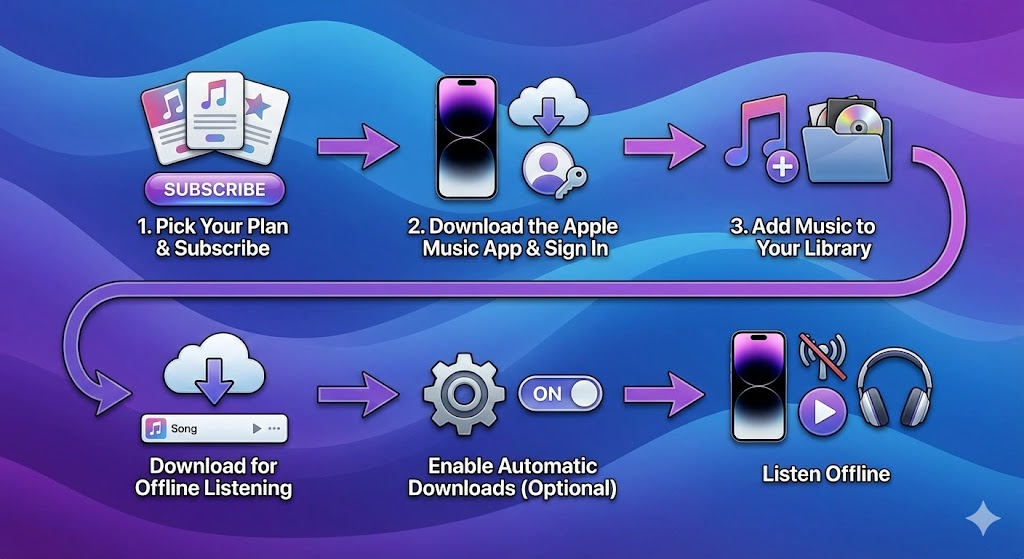
Step 1: Pick Your Plan & Subscribe
- Choose the plan that fits your needs (Individual, Student, or Family) and sign up to unlock full access to Apple Music’s features.
Step 2: Download the Apple Music App & Sign In
- Install the Apple Music app on your device, then sign in with your Apple ID to start exploring.
Step 3: Add Music to Your Library
- Browse and discover your favorite songs, albums, and playlists, then add them to your library for easy access.
Step 4: Download for Offline Listening
- Tap the download icon next to any song, album, or playlist to save it for offline listening.
Step 5: Enable Automatic Downloads (Optional)
- Turn on Automatic Downloads so new music is instantly saved to your device without you needing to manually download it.
Step 6: Listen Offline
- When you’re offline, go to your “Downloaded” section in the Library and enjoy your saved music without an internet connection.
6. Who Should Go for Which Plan Simple Decision Guide
Choosing the right Apple Music plan depends on how you listen and share music. Here’s a simple guide to help you decide.
| Situation | Recommended Plan |
| You listen alone | Individual Plan – Best for solo listeners who want full access to music. |
| You’re a student | Student Plan – Same features as Individual, but at a discounted rate. |
| You share music with family or close friends | Family Plan – One subscription for up to six people, each with their own library. |
| You like offline listening or travel frequently | Ensure you download your favorite songs and playlists ahead of time for offline use. |
At Last
To wrap it up, Apple Music is a fantastic choice no matter how you listen to music. Whether you’re flying solo, a student on a budget, or sharing tunes with family, there’s a plan for you. With its huge song library, offline options, and smooth device syncing, it’s designed to make listening easy and enjoyable. Just pick your plan, set up your account, and you’ll be enjoying your favorite music anytime, anywhere. Music made simple -that’s Apple Music.